Considerations in Evaluating a Batch Fulfillment System

Download PDF

As specific business needs dictate, the following requirements should be considered when evaluating a batch pick system. The batch pick system should:

  • Either increase picking productivity and reduce the overall operational labor OR increase operational capacity and possibly eliminate facility expansion
  • Provide user (selector) interfaces that are simple, easy to read, visible for all work positions and free the use of selectors hands as much as possible
  • Satisfy order accuracy requirements
  • Provide physical compatibility of carts, modules and stations within aisles and the overall facility
  • Provide seamless integration of carts, modules and stations of multiple types
  • Allow highly efficiently handling of normal job processing as well as exceptions
  • Provide a simple means of allowing customized pick exceptions
  • Support multiple picking strategies (pick and pass, bucket brigades, gather and pack, etc.
  • Minimize release and setup time for complete & new orders
  • Organize work to minimize transit time
  • Allow selectors to re-locate and change direction of their assigned work
  • Allow efficient transfer of containers between locations
  • Adapt, in real time, to operational variances and user modified conditions
  • Allow simple inclusion of new storage locations and deletion of existing locations
  • Allow simple organization of the pick path sequence suggested by the system
  • Minimize disruption of existing operations during installation
  • Minimize modifications required to existing software system

In addition to the above stated requirements, the following system features are also worth considering:

  • Number of and ergonomic suitability of batch pick cells
  • “Next start” order optimization
  • Efficiency in utilization of pick cells, allow staging to avoid wasting
  • Battery life
  • Multiple validation options for the picked item:
    • No validation
    • Scan storage location
    • Scan item UPC
    • Scan storage location or item UPC
    • Scan storage location and item UPC
    • Full visual validation
  • Multiple validation options the correct order to pick:
    • No validation
    • Scan cell
    • Scan container
    • Scan cell or container
    • Scan cell and container
    • Voice assisted picking
  • Put lights options
    • Single light per cell
    • Put lights—numerical display per cell
    • Put lights with one confirmation button per vehicle
    • Put lights with one confirmation button per cell
  • Automatic drawers with push/pull mechanisms
  • Zone inventory managed by:
    • Host computer
    • Batch pick system
  • Cartonization:
    • Host cartonized (system has to allow selectors to split cartons in case of cartonization error)
    • Selector cartonized
  • Vehicles
    • Push cart
    • Self-propelled cart
    • Cherry picker vehicle (flat rack and carousel rack)
  • Storage locations
  • Fixed and non-fixed SKUs
  • Single and multiple SKUs per location
  • Single and multiple locations per SKU
  • Multi-zone operations
  • Video camera to help selector “see” what is in front of the cart
  • Internal phone system/PBX connection to workstations
  • Shortest path information to reach the next location from any place
  • Pick-Through-Zero for “opportunistic” cycle count
  • Weight validation

Smart Cart Vendors

SOFT™ supports all the listed features for batch pick systems and can implement any additional features that the customer may require for their specific application.

Vendors:

Effective Queues

Download PDF

Queues and work buffers are found commonly in both production and fulfillment operations. A queue is a “temporary location” used to buffer work between processes. It is observed that there is a near universal notion among operations personnel that their current queues are not sufficiently large, and increasing those queue sizes will lead to greater capacity or productivity. It may be enlightening to share a “story” of a queue that we had many years ago.

We were called to visit an older production facility. The production facility was buried in or surrounded by the town in which it was located. The facility had hundreds of large pieces of production equipment that covered the floor. We were called because production requirements were growing rapidly and space for new equipment was gone. Expanding the facility was impossible due the unavailability of land. Moving to a new site was not even considered due to the cost. The company was looking to free more production floor space by more effectively using a significant space that was currently used for “work in process” (WIP). Their idea was to buy some (a lot of) ASRS equipment to hold WIP. Understanding this problem, as we were escorted through the facility, we would stop and talk to the workers at the production machines. Pointing to their input WIP queues we would ask, “How long will it take for you to finish the work in that pile?” The answer came back in the number of weeks. Likewise, pointing to the workers outbound WIP queue we would ask, “how long will it be until someone comes and picks up that completed work?” Once again the answer would once again come back in the number of weeks.

As you can imagine, we did not recommend that ASRS equipment be added. Rather we recommended that they more effectively use the queue space they already had thus recovering production space by reducing the amount of WIP.

Just how big should a queue be? This paper addresses that subject and you will be surprised to find some of the factors that are part of that determination!

First, let us address do we need queues at all? A queue provides a buffer to allow “unsynchronized” processes to be coupled together without mutual interference. Unsynchronized processes are those that start and end independently of each other. Synchronized processes are processes that are coupled in time. Good examples of synchronized processes would be those seen in an automobile production line where the line continuously moves through production zones (processes). Without queues, processes are required to be synchronized and the overall production rate is limited by (no faster than) the slowest process. Conversely, an example of unsynchronized processes is seen where there are pickers and packers working independently in a fulfillment facility. In this situation, workers start and complete work asynchronously. Unsynchronized processes coupled together without queues require one process to wait on the other reducing efficiency.

Conclusion #1: Coupling unsynchronized processes is benefited by utilizing queues through elimination of wait times. In determining the required size of a queue between unsynchronized processes the sustained work rates of each of the two processes must be considered. If they are not balanced, the queue size must be infinite. Smaller queues will only temporarily help in coupling unsynchronized processes with permanently unbalanced work rates.

Conclusion #2: Queues between unsynchronized processes that are permanently imbalanced are only a temporary benefit and once filled or emptied they no longer improve efficiency by eliminating waiting.

Queues between processes that have temporary work imbalances need to be evaluated to determine their real effectiveness. Queuing temporary imbalances implies that processes have the capacity to “make up” lost time. This can mean one of two things, either you are not normally working at full capacity or you will work longer. Another related consideration is the concept we regularly encounter is a concept or a desire to “get ahead”. From an overall operational perspective “getting ahead#8221; is an illusion of productivity or capacity improvement. “Getting ahead#8221; may have some merit in processes that are inherently unreliable and are likely to get behind later however the better solution is to improve the reliability. The entire operation has capacity and having one area “getting ahead” yields no improvement. Getting ahead is another way of saying that a permanent imbalance between processes exists.

Conclusion #3: Determining or defining to what extent and how lost time is “made up#8221; and the extent to which “getting ahead#8221; is tolerated are important considerations in determination of queue size.

The last and most important, as well as surprising, factor in determination of required queue size is the result or product of the operating paradigm that management dictates for the facility. To demonstrate this, consider the following. What would be the response if you as the operation manager were to ask a floor supervisor: “How would you feel a large (or larger) queue or buffer between X and Y would benefit you?” With rare exceptions the supervisor would state that such a buffer would be of benefit. Why would such a response be the normal situation? It is because the floor supervisors rightfully see their own individual areas of responsibility independent of the entire operation. Likewise, if you as the operation manager were to ask floor supervisors: “Who could use more labor?” You would rarely get a negative response. In common practice we do not ask that question to all floor supervisors, just those supervisors that we see as the “bottleneck” of the operation. We “look” for bottlenecks, and normally our first inclination is to build a queue around the bottleneck. By identifying a “bottleneck” we need to realize that we are also identifying “overstaffed”, “over queued” and “under utilized” areas. Normally the adding or increasing the queue to a bottleneck will not reduce the bottleneck. There is flatly a work imbalance. Balancing work eliminates the bottleneck.

So how is it that we claim that the operating paradigm that you as a manger create influences or even determines queue size? Having floor supervisors of the various operating areas in competition with one and another or having them want to insure that they are not the one that held responsible for a capacity or production shortfall, you are forcing them to not only hoard their own resources, but to campaign for queues. They will make certain that their area of responsibility is not seen as a problem. They will show you the “great queues” of work that they have for a downstream area of the lack of work in the upstream process queue. They are proud of their queues!!! Their queues are their protection! Their queues are a visible demonstration of their area’s success. Bigger queues needed? You bet—they cannot be big enough!

Conclusion #4: A queue can never be large enough for a floor supervisor whose success is measured by only his or her own area of operation.

So What About Queue Size?

If what you truly need is added storage space, add it. Do not call it a queue. The key to effectively using queues is work balancing. Create a “common measurement of success for the facility” and have all supervisors see the “big picture”. Recognize that exceptions “are the rule” and imbalances will occur. Realize and acknowledge that a supervisor does not normally cause an exception. Then look to ways to make work imbalances as small and as short as possible. Focus supervisors on how to quickly identify an imbalance. Then develop a plan to quickly respond to the imbalance. A simple method for response to an imbalance may be implemented by creation of small groups of flexible workers that may be quickly deployed from the areas that are “building queues” to struggling areas. Quick response = small queues, slow response = big queues. The true measurement of queue size is in minutes (or seconds) of work it will buffer. Measurement of how may cartons, pallets, or items a queue contains is a meaningless fact. Balance work—don’t build bigger queues. Don’t create rewards for big queues or always empty queues. Recognize that overflowing or under-running an adequately sized queue is actually reducing productivity due to inefficient use of labor. Next time you walk the floor look at those queues. Queues that are normally full or empty are usually not a reflection improper queue sizing, rather a reflection of unbalanced operations. If you are at a point where it becomes nearly impossible to manually manage work balancing, we at VAADS have automation methods that allow early detection and automated response to impending imbalances. Happy queuing!
COFE Architecture

Download PDF

COFE is a highly scaleable, distributed, realtime, “transaction based” software platform. This platform was created for, and is ideally suited for implementation of distribution and order fulfillment centers In this particular context, a “software platform” is a layer sitting on top of a base operating system that provides a consistent structure and support for specific applications as well as providing common functionality that is required for in most distribution operations.

“Transaction based” refers to how information is conveyed between system elements. Transaction based systems primarily use “messages” to communicate between system elements or modules. The converse of a “transaction based” system is one that primarily uses either databases or other data structures that are shared between system elements or modules to convey information. Transaction based systems are inherently “event driven” where a transaction is created to signify and convey information pertaining to an event. Transactions may initiate an update to a database, the actuation of some piece of equipment, update a user screen or initiate other transactions. Transaction based systems provide an elemental feature of being able to be “distributed” across multiple computing elements. This distributed characteristic provides for scalability where computing elements to handle the transaction load may be provided to meet the system requirements. COFE is a “realtime” platform in as much as transactions are executed as the associated event occurs.

The COFE architecture originates from technologies initially developed in the 1970’s and the implementation of the architecture has been continuously improved over the ensuing years to meet today’s demands of stability, performance, and greater functional requirements.

COFE based systems are comprised of numerous independent software modules or “transaction handlers” that are called “servants”. “Servants” are “operationally defined” by the functions they are to perform. A single “servant” module may support or handle a number of transactions. Typical systems may contain hundreds of servants with each servant being a small module providing a limited set of services.

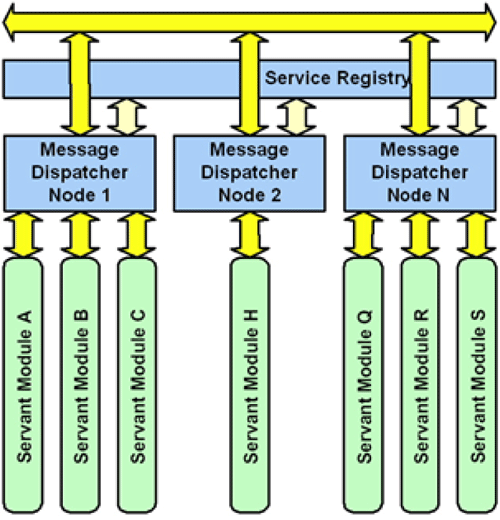
The heart of the COFE platform is a process (or a program) called the “message dispatcher”. A copy of the message dispatcher runs on every computing element (COFE node) in a system. The message dispatchers perform three basic functions:

  1. Receive messages from servant modules and route those messages to the responsible servant
  2. Spawn or bring into execution any servant module that is required to perform a service (execute a message or transaction)
  3. Spool (queue) messages for servants that are not currently able to process a new message.

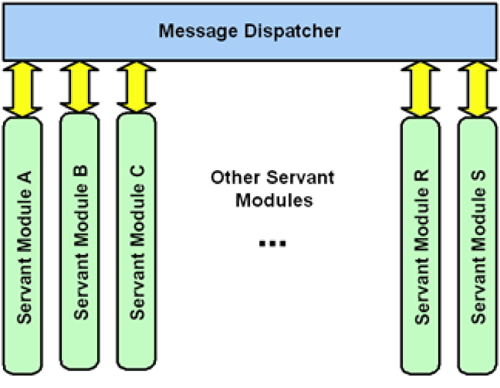
Referring to figure 1, servant processes (modules) communicate only with their associated message dispatcher. Any requests for a service are dispatched to the associated servant process by the message dispatcher and any requests for a service by a servant process are delivered to the message dispatcher for routing to the proper servant. It should be noted that at times, a servant process may request a service that is provided by the requesting process. That request (transaction) is routed just as any other request for an external service.
Figure 1

Figure 1

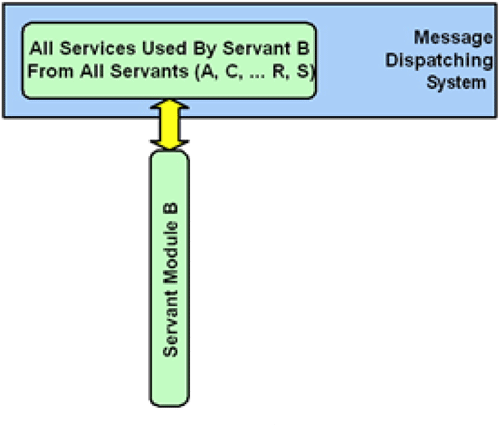
To a COFE servant process, the message dispatcher “looks like” the balance of the entire system. Servant processes are only aware of themselves (the services they provide) and the message dispatcher, which they believe provides all of the rest of the services they require. This is illustrated in figure 2.
Figure 2

Figure 2

Servant processes register the “services” they provide with their own message dispatcher. Upon receipt of service registration information, a message dispatcher makes that information available to all other dispatchers in the system. The other dispatchers know how to route messages they receive to the appropriate service provider (servant module). This is illustrated in figure 3.
Figure 3

Figure 3

The COFE platform provides a stable and reliable base to construct simple, modular, independent, and easy to understand servant processes. This platform proves itself daily in providing uninterrupted service for delivery of billions of dollars of product.

Computing Requirements For Dynamically Optimized Systems

Download PDF

In the world today we continually hear of the automation of everything: walking machines, space probes, voice recognition, and driverless motorcycles. One thing each of these endeavors has in common is the “operating environment” of the device is unpredictable. In order for the device to function, the device must automatically adapt to conditions, as they currently exist.

Our industry, the automation of distribution or fulfillment centers, was one of the first to “automate”. Some of us can remember the days when our inventory (information) was kept (stored) on cards and a “new inventory control system” was a new set of drawers where we keep the cards, or a newly hired inventory clerk.

Being one of the first to automate has its benefits and drawbacks. The benefits are the experience it gives us, the drawbacks are also the experience it gives us. The drawback of our experience is that we set in our minds ways of thinking that may be no longer beneficial. Trying to avoid too much controversy in this statement, we will provide a single example. How do we handle a “lost” item in an inventory system? Inventory systems have both financial and fulfillment implications that are at “odds” with each other. Count the times you have seen “lost” items “planned” to be “sold”. Wouldn’t it be nice if we could just cut an invoice stating: “Dear Customer, we lost the item you ordered so please accept this IOU until it is found. We know it is here somewhere. Thanks for your patience, Sincerely, Customer Service.” Lost items have absolutely no value to the distribution process. Likewise, found items should have immediate value to the distribution system. However, trying to create such a “distribution” inventory control system today creates such a pushback from finance due to “their inherited experience” of how automation should work. Finance inherently operates on data, and their view is that reality needs to conform to the data, and that we can “plan” from that data. Conversely, distribution operates on reality and their view is that the data is to conform to reality, and while something may be “planned” the execution of that plan is subject to change.

By now you should be asking: What has all of this to do with “Computing Requirements For Dynamically Optimized Systems”? Dynamically optimized systems use a technique called “concurrent planning and execution”. Concurrent planning means that the “plan” is rolling forth as it is executed. The automated devices identified in the first paragraph of this paper are examples of automation where “concurrent planning and execution” are required. The example of the driverless motorcycle demonstrates this condition. The motorcycle takes a different path each time it passes the same area. It is “trying” to go on the same path, but unforeseen conditions cause it to tilt slightly, a puff of wind, a bump, and then the correction. But the correction requires a change in the path.

These are exactly the same conditions that exist in a distribution center. We may have a great plan but “hiccups” force the path to change. The programmer of the motorcycle could easily devise a program (plan) that “knew” all of the conditions that would be encountered, and then executed the “plan”. If the motorcycle hit a rock that was not part of the plan, the programmer could say: “It is not the fault of the program at all, the rock was not identified. Once we put the rock in the plan the motorcycle will work perfectly”. This is exactly how most distribution systems are operated today. The plan works perfectly and efficiently as long as it is executed properly.

Dynamic optimization or concurrent planning and execution is the alternative to static planning and perfect execution. This however comes at a cost. It takes more computing power to dynamically plan and execute than to batch plan and execute.

At VAS we use a “scalable” computing platform that allows us to add computing power as necessary to insure that we have adequate resources to make timely adjustments to the unfolding plan. We have a great example of the “scalability” of the computing platform that we use. In a very large project (300,000 single units a day delivered in orders ranging in size from 10-50 units) was designed in the mid 90’s using “state of the art” Intel 486-100’s. To implement the project a server cluster of 30 CPU’s was used. In the ensuing years, the CPU’s were replaced with faster machines. The computing hardware was reduced to 9 servers and not a single program had to be modified to make the change. Why 9 machines rather than 3 or 4, after all the CPUs are over ten times faster? Because of the speed improvements of the disk drives have only increased three fold.

The scalable platform VAS uses is called MandateIP&#reg;. It runs on Intel CPUs under Linux (or Windows). MandateIP&#reg; is a derivative of a product called Mandate that has it roots back into the mid 1970’s where engineers at VAS installed their first distribution systems. MandateIP&#reg; and its predecessors have 100’s of man-years of development. MandateIP&#reg; is stable providing reliable delivery of billions of dollars of good annually.

Could VAS competitors provide software that concurrently plans and executes? Probably so, but as of now, no one to our knowledge have platforms that support such a structure. Why? They have come from a different set of experiences where the “view of the world” is that reality is to conform to the data. This is a typical programmer’s view. A view where the when “plan (program) is correct”, it will operate perfectly if the execution is done properly. A great real example of this mind set, is an operations person was questioning a very intelligent programmer concerning the cumbersome method the programmer had implemented to resolve an exception. When questioned, the programmer responded that it was done intentionally, the “real problem” was that a mistake had been made by a worker to create the situation and if it were too easy to correct, it would only encourage more mistakes. Usually a few well chosen questions will enable you to determine if a system provider understands the necessity of dynamic optimization in fulfillment operations.

At VAS our view and experiences are much different. We believe that reality is just “what is” and that the data should model reality and be adjusted to continually match what is known. This enables us to deliver systems where we concurrently plan and execute to achieve the goal at hand.

What are the “Computing Requirements For Dynamically Optimized Systems”?—A scalable platform with timely support of the decisions necessary to reach the desired objectives. This is MandateIP&#reg;!

Introduction To MandateIP® Database Architecture

Download PDF

Dependable information systems require a stable and responsive means of storing and retrieving data. This paper describes the MandateIP&#reg; database architecture and how that architecture provides the highest possible level of data availability while meeting the transactional demands encountered in real-time applications. The paper is divided into three main topics. The first topic addresses the actual database engine and the architecture for integration with the application programs. The second section addresses the challenges faced by the MandateIP&#reg; database architecture and how those challenges are handled. The last section describes the availability and recoverability of data in abnormal conditions (failure handling and recovery).

Database Engine And Application Process Integration

The MandateIP&#reg; database architecture is based on an “SQL” database engine. The architecture itself does not dictate the use of any particular vendors engine although the various vendor’s engines have their own individual strengths and weaknesses. The selection of the particular engine is primarily based on the user or client’s preference. Initially MySQL had been the preferred engine primarily due to its performance, replication features and its licensing policies. Oracle has been a close second and with recent MySQL licensing changes Oracle and MySQL have equal preference.

As with the base MandateIP&#reg; architecture, the MandateIP&#reg; database architecture is a “distributed” model where processing may be seamlessly spread across multiple computing elements. The MandateIP&#reg; database architecture identifies related datasets and then allows the assignment of an individual dataset to a database engine executing on a particular computer. Application processes closely associated with a particular dataset are assigned to computing elements that have high accessibility to the computer in which the dataset is hosted. This architecture provides a natural scalability allowing the platform to be used to implement an extremely broad range of systems. Systems with only minimal performance requirements to systems with massive performance requirements can be built on one platform architecture.

Challenges Of Dynamically Optimized Systems

Real-time or dynamically optimized systems place some challenging requirements on data availability. Real-time systems are systems that require decisions to be made within a guaranteed timeframe. Dynamic optimization makes decisions “on-the-fly” where the decision is based on current system conditions based on a set of rules for making the decision. This makes it necessary to have availability of the data to make the decisions within the required limited timeframe. Since many VAS systems involve the control of mechanical equipment, many of the required time frames may be very short (milliseconds). An example of these requirements is one in which an “optimized” sorting system continuously sorts 36,000 units per hour (10 sorts per second), and each sort decision involves 4 separate events (144,000 transactions per hour) for the sorting operation only. This system must make individual decisions within a 200 milli-second window decisions.

The database architecture of MandateIP&#reg; meets these challenges through a number of related techniques and procedures. MandateIP&#reg; database architecture uses an “event driven” model where events are communicated through messages. For events that alter a dataset, the application process processing the event is responsible to update or modify the dataset.

Events initiate dataset modification—dataset modification does not initiate events. By isolating datasets to individual computers, data availability is increased since multiple CPUs and disk drives share the responsibility. Additionally, restrictions of database access can be easily made insuring that the real-time processes have timely data availability. The MandateIP&#reg; database architecture provides tools (and reporting means) for accessing data that do not impact time-critical processes. It is not recommended that MandateIP&#reg; datasets be accessed through other means. Likewise, the computing platforms used in a MandateIP&#reg; system have been selected to allow the required processes to function within the real-time required timeframe. It is likewise possible to interfere with system operation CPU and data resources are used outside the architecture provided.

Data Availability And Data Recovery

Data availability and thus the underlying data architecture is never an issue during “normal system operation” in a properly designed system. Data availability only becomes an issue during and following some abnormal or “failure” situation. This section of the white paper discusses data from a “system failure” and “recovery” perspective. The nature of a “system failure” is extremely diverse, and can range from a power failure, a computing hardware crash, a network failure and even a software bug. The MandateIP&#reg; data architecture supports multiple servers. Individual servers may have differing requirements in terms of performance, volatility, and recoverability of data. Some servers with extremely low volatility (very limited changes) may only require backup procedures to insure data availability. The servers that have high data volatility and high transactional demands are normally supported with RAID 5 hardware controllers incorporating battery backed up cache and SCSI drives.

Some systems may have some even greater challenges. In extreme cases the MandateIP&#reg; architecture supports the creation of a “real-time transaction log” for the recording of data changes. The transaction log provides a means to re-build a highly volatile data set from a given point to allow for recovery from some of the more obscure failures (i.e. a failure of a hardware RAID 5 controller could potentially destroy an entire dataset). The method of using a transaction log for such cases provides a completely separate mechanism (CPU, drive controller, drives, power supply…) for maintaining data.

Normally VAS and the customer jointly agree upon the specific computing hardware for system implementation. If the customer has no preference, VAS generally uses Dell equipment. It is interesting to note that some “Computing Industry” terminologies have a somewhat different meaning to VAS as they have to others. In particular, a “server class” machine normally is thought of in the industry as a “high speed machine”. At VAS, performance of a machine is normally not of utmost importance, for our architecture allows us to obtain performance through distribution of work—additional machines. Reliability is of much greater importance to us than performance. This same feature of our architecture (distribution of work across machines) is why we have no real preference to a particular database engine.

With any of the methods mentioned above, the recoverability of operation has a “time restraint” in which the recovery is accomplished. The MandateIP&#reg; database architecture is designed to minimize this recovery period. Recovery periods for a failed RAID 5 disk drive are essentially zero; where as recovery from other failures and with other servers may take from several minutes to nearly an hour. Rebuild of a data set from a transaction log may take longer depending upon how much data must be applied to from the last backup point.

Conclusion

In conclusion, the MandateIP&#reg; database architecture uses third party database engines distributed across multiple computing elements to obtain the necessary performance to achieve the desired system operation. The architecture incorporates standard industry methods to obtain a high degree of data availability and rapid error recovery.